



Carving a pumpkin out of math.
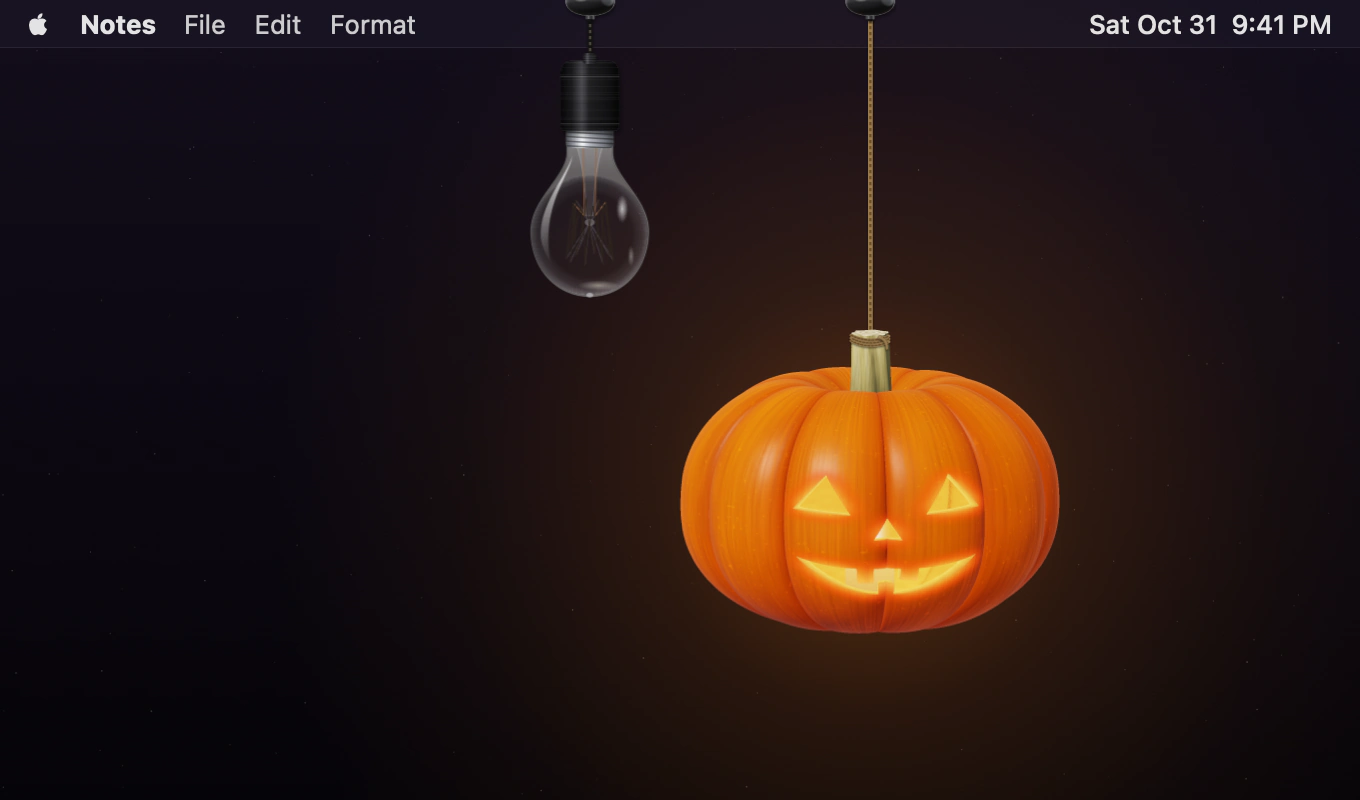
Pumpkin Lights hangs a jack-o’-lantern from your Mac’s menu bar. Click it and the candle lights up, switching your Mac to Dark Mode. Pull the cord on the light bulb next to it and Light Mode returns. Both hang from cords that you can swing and spin.
I wanted two things. I love Festivitas, Simon B. Støvring’s app that strings Christmas lights along the menu bar, and I wanted something like it for Halloween. And I switch between Light and Dark Mode every day, and it has always been a toggle buried in Control Center. It should feel like lighting a candle when it gets dark, and pulling a cord when you want the light back.
There are no image assets, 3D models or audio files in the source code. The pumpkin is defined by an equation. Its face is made from a few Bézier curves. The candlelight comes from a small light transport calculation, the cord from a chain of particles, and the click from noise and decaying sine waves. Even the app icon, trailer and trailer music are generated by the app itself.
So here’s how it’s made. Every image below is produced by the same renderer that draws the pumpkin in your menu bar, including the close-ups.
Growing the shape
A pumpkin is mostly a squashed sphere. I start from a super-ellipsoid, |r|^e + |y/b|^e = 1. With e = 2 that’s an ordinary ellipsoid. Pushing e up to about 2.3 flattens the top and bottom and fills out the shoulders, and that’s what makes it read as a pumpkin rather than an orange.
To make the ribs, the radius changes with the angle around the stem:
// Simplified.
func lobe(_ phi: Float) -> Float {
    let t = phi * Float(ribs) / (2 * .pi)
    return pow(abs(sin(.pi * t)), ribSharp) * ribScales[rib(t)]
}

/// The pumpkin: negative inside, positive outside.
func body(_ p: F3) -> Float {
    let r = (p.x * p.x + p.z * p.z).squareRoot()
    let phi = atan2(p.x, p.z) + ribTwist * p.y
    let R = 1 - ribDepth * (1 - lobe(phi))
    // …plus the dimples and a slightly low belly
    return pow(abs(r / R), e) + pow(abs(p.y / b), e) - 1
}
|sin| raised to a power below 1 (here between 0.38 and 0.5) stays broad and round across each rib and drops sharply into the groove. The ribs bulge and the grooves crease, like the real thing.
Then I add the irregularities. Each rib varies in size by up to 3.5%, and the ribs turn slightly as they go up. There’s a depression around the stem, a smaller one at the bottom, and a belly that hangs a little low. The stem starts as a ridged cylinder, widens at the base, bends to one side and twists along its length. Its center line stays fixed to the axis at both ends, so the cord’s attachment point remains in place however the stem bends.
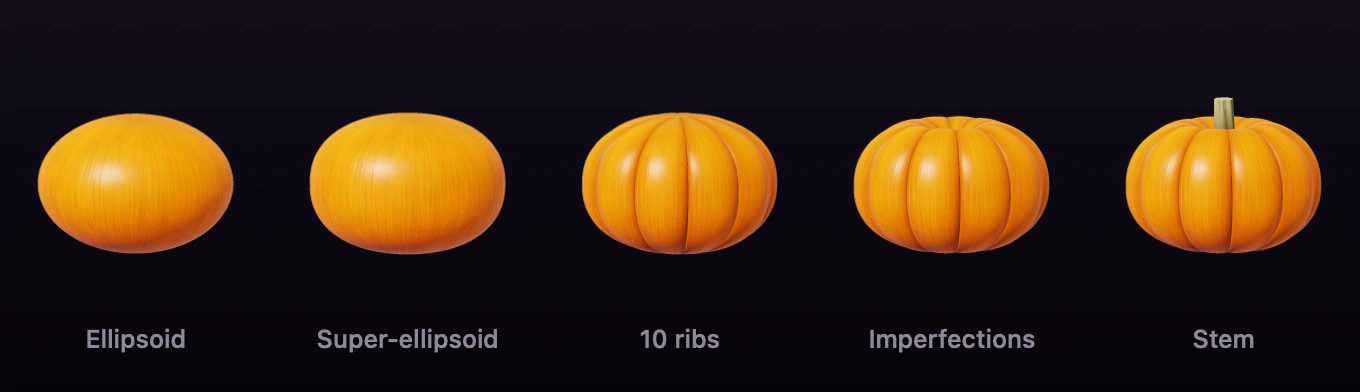
All of these variations come from a random generator using a single integer as its seed. The “Grow a new pumpkin” button in Settings simply chooses another seed.
Tracing it, one pixel at a time
The pumpkin has no mesh. For each pixel, a ray enters the scene and advances in increments of 0.012 times the pumpkin’s radius until the function changes sign. Twelve bisection steps locate the crossing precisely. The surface normal comes from the function’s gradient, estimated by shifting the point slightly along each axis. Each pixel combines nine rays, with rows processed in parallel across the CPU cores. The entire renderer runs on the CPU, written in Swift using SIMD types.
The skin gets its color from several layers of noise: large patches of mottling, fine lines running from the stem to the bottom, light speckles, darker grooves and a dry blossom scar underneath. Those fine lines also perturb the surface normals to make them respond to light. The lighting combines a warm key light from the upper left, cool fill from the right, a soft overhead sky and warm reflected light from below. There are waxy highlights and a thin Fresnel rim around the edges. Ambient occlusion inside the grooves helps the ribs retain their shape even in shadow.
Carving the face
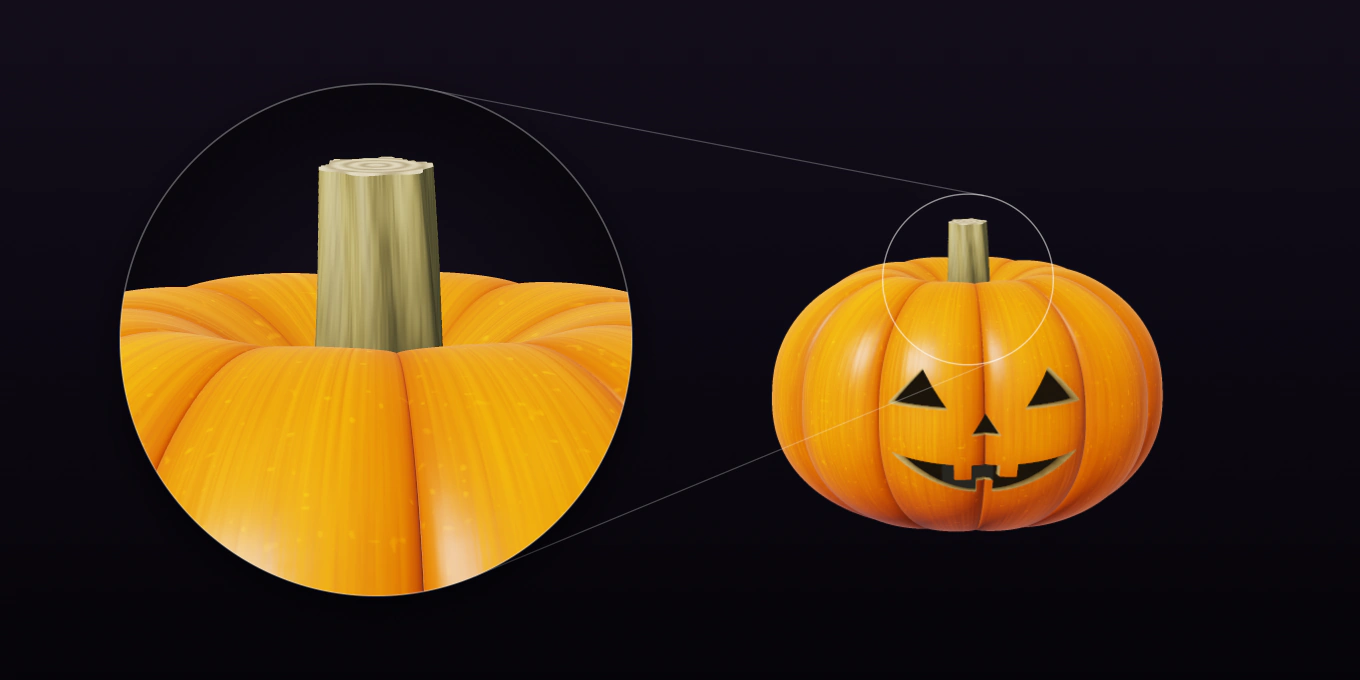
The face begins as a flat design, using the coordinates you’d get from unwrapping the skin: the angle around the pumpkin horizontally and the height vertically. The eyes, nose and mouth are Core Graphics paths. The selected carving style determines their basic shapes, from classic triangles to spooky fangs or cute round eyes. The seed adjusts details like eye tilt, spacing, smile width and the number of teeth. The resulting paths are rasterized into a 512 × 512 mask.
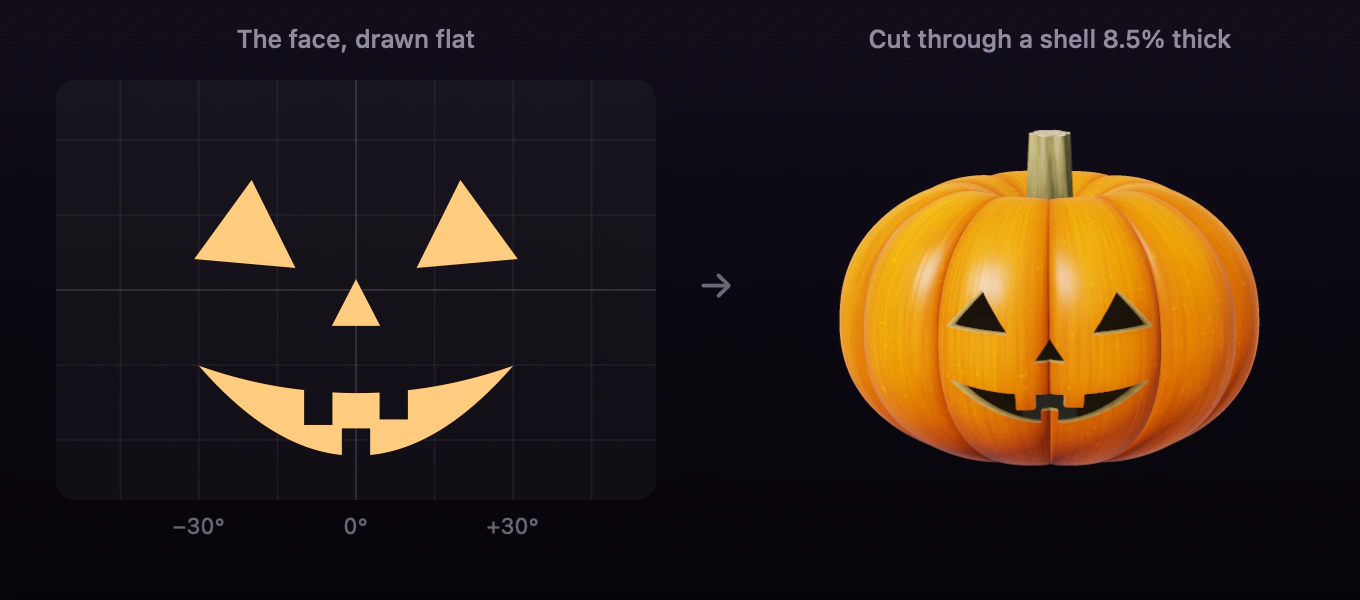
For the carving to work, the pumpkin needs some thickness. It’s hollow, with an inner surface made by scaling down the outer one, leaving a shell 8.5% of the radius thick. When a ray reaches part of the skin marked as a cut, it continues inward in small increments:
// Simplified from the renderer.
if cut(at: p) {
    while true {
        t += 0.003
        let q = origin + direction * t
        if inner(q) < 0 { return hollow(from: q) }    // through the shell: into the pumpkin
        if !cut(at: q) { return flesh(at: q) }         // still in the shell: the cut’s wall
    }
}
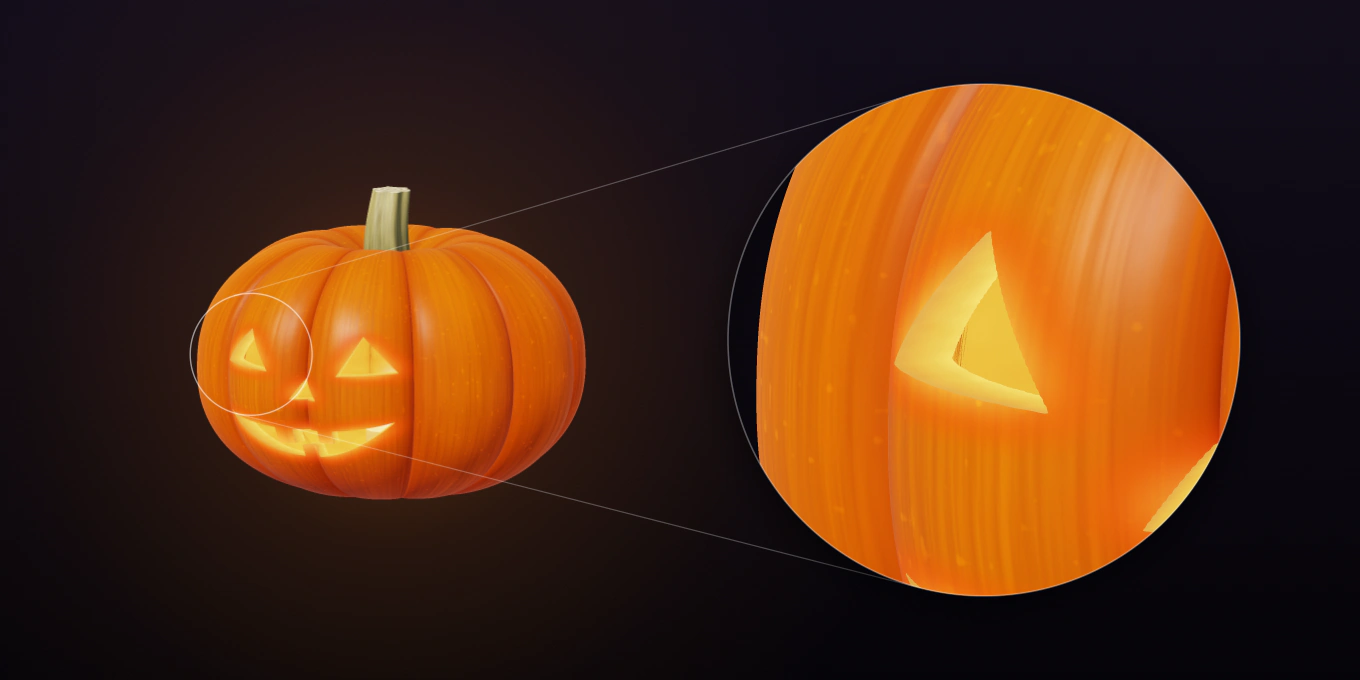
This gives every opening a visible wall. Rotate the pumpkin and you can see the thickness of the carving. Once the candle is lit, those walls glow, with the deeper parts appearing brighter because they’re closer to the flame.
Lighting the candle
Rays that enter the hollow continue until they reach either the candle or the opposite wall. Along the way, they pass through a small, elongated glow representing the flame and accumulate its light. The inner surface is illuminated according to its distance from the flame, brightest near the candle and gradually darker toward the top.
Actual pumpkin flesh is translucent, allowing candlelight to spread through the skin near a carving. Properly simulating that would require subsurface scattering. I approximate the effect using a blurred version of the carving mask. Areas closer to an opening receive more of the candle’s glow.
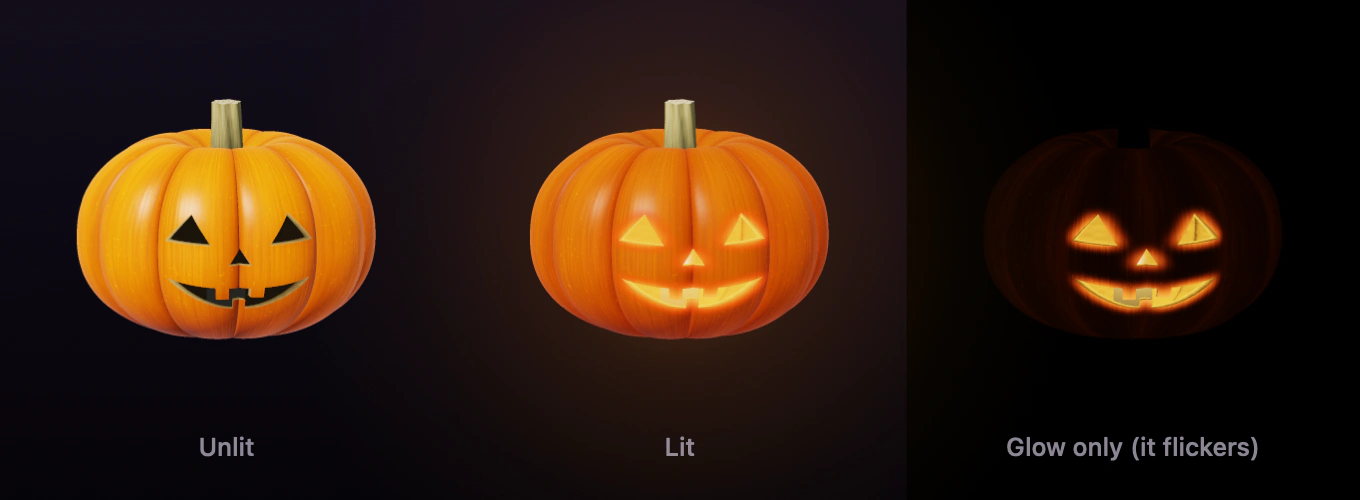
Each frame has three renders: the unlit pumpkin, the lit pumpkin and the glow by itself. Clicking blends the unlit image into the lit one, while three noise layers moving at different speeds animate the flicker. The flame sputters for just under a second before stabilizing. Click again and a breath extinguishes it, sending a small puff of smoke from the stem.
Forty-one pumpkins
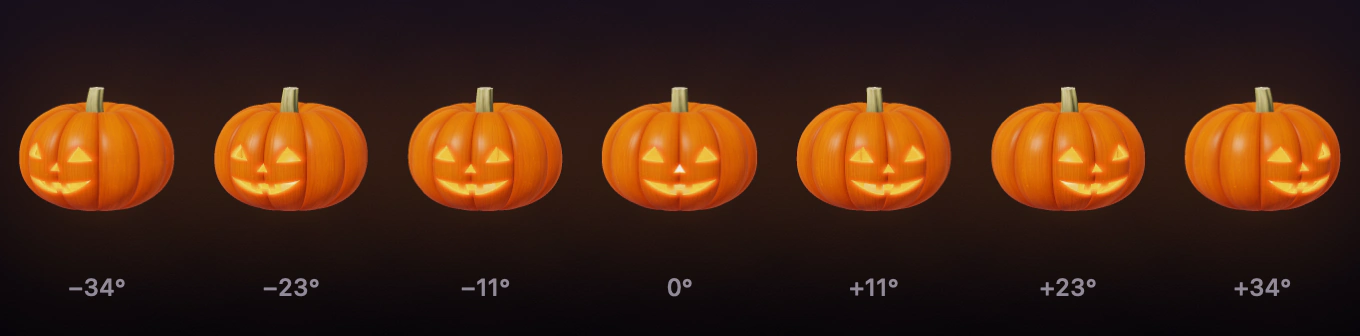
CPU ray marching is much too expensive to run at 120 frames per second. Luckily, a swing only tilts the picture, which costs nothing. Twisting around the cord is the only motion that needs a different render. So the app renders it at 41 angles, from −34° to +34° in steps of 1.7°. It starts in the middle and works outward, in the background, and caches the frames on disk. On screen it cross-fades between the two frames on either side of the current angle, so the turn is smooth. After the first launch it’s instant.
The twisting motion uses a damped spring with a little slow-moving noise. Drag or flick the pumpkin and it rotates before gradually returning to rest.
No two alike
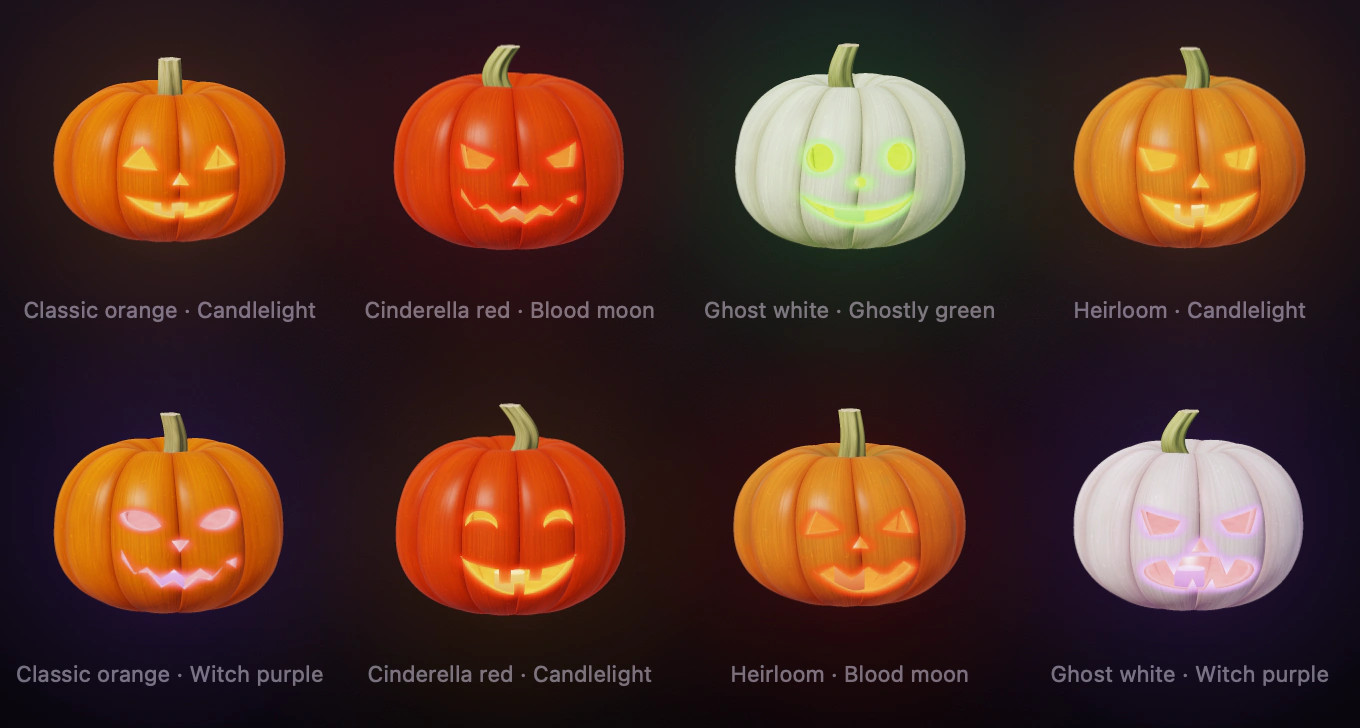
Nearly everything is customizable. There are four skin varieties, classic orange, Cinderella red, ghost white and heirloom, along with different carving styles, glow colors, sizes, flicker and glow intensities, and cords ranging from black fabric and jute twine to candy stripes. You can also keep your current style and generate a new pumpkin.
A cord you can swing
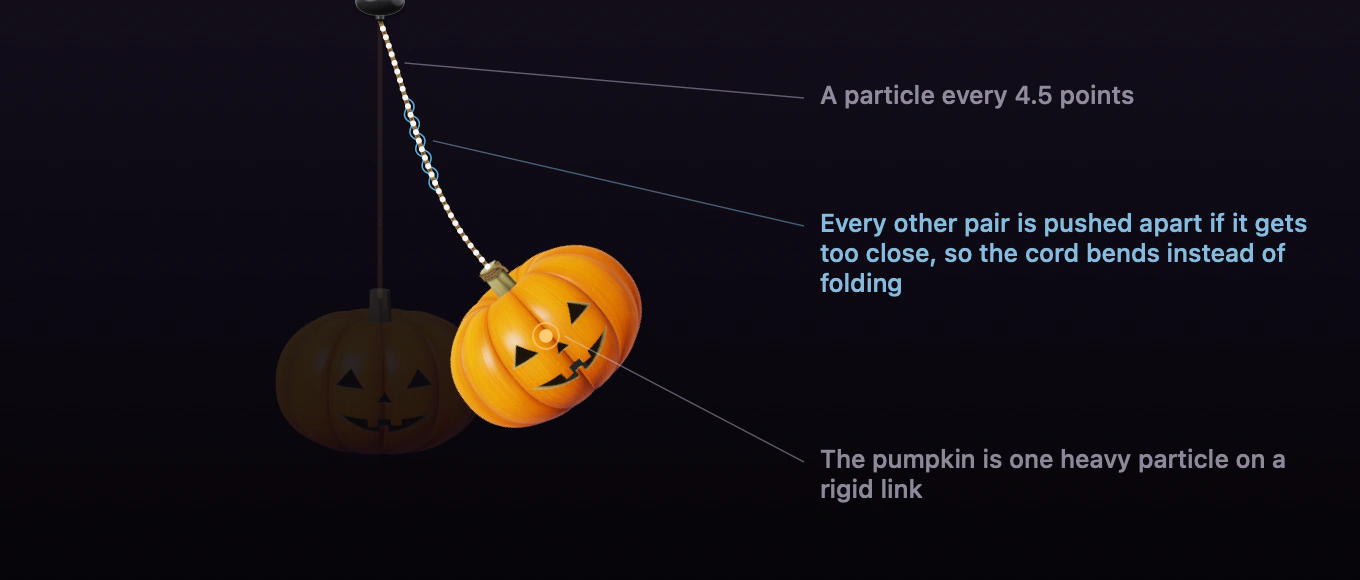
The cord is simulated as a series of particles spaced 4.5 points apart. It uses Verlet integration, where each particle stores its previous position and velocity is calculated from the difference. The pumpkin is represented by one additional, heavier particle, attached below the cord’s end by a rigid link. The angle of that link determines how the pumpkin is drawn. Each frame runs four physics substeps, with fourteen iterations of the constraints in each one.
Simple distance constraints make the chain fold into sharp angles, almost like a necklace of beads. To smooth it out, I also keep every second particle at least 1.9 segment lengths apart. These extra constraints only push particles away from each other, applying equal forces to both so they don’t introduce momentum. The cord bends more like a fabric-covered cable and connects cleanly to the stem. Visually, it’s rendered as one continuous Catmull–Rom spline through the particles.
I learned two things the hard way. First, even a tiny steering adjustment of 1.5% toward a particle’s intended position becomes very noticeable when repeated 56 times per frame. It creates an obvious kink. Second, a perfectly vertical rope can settle into a stable zig-zag. Adding a tiny random displacement at the start and preventing particles from rising above the canopy solves that.
The cord also acts as the switch. Pulling the pumpkin downward lets the cord extend from the canopy by up to 20 points. Once it passes 12 points, the switch activates, just like a physical pull cord. The app checks how the pointer has moved since mouse-down and only accepts a clearly downward pull. Swinging the pumpkin sideways won’t accidentally change your Mac’s appearance.
Brass, porcelain and glass
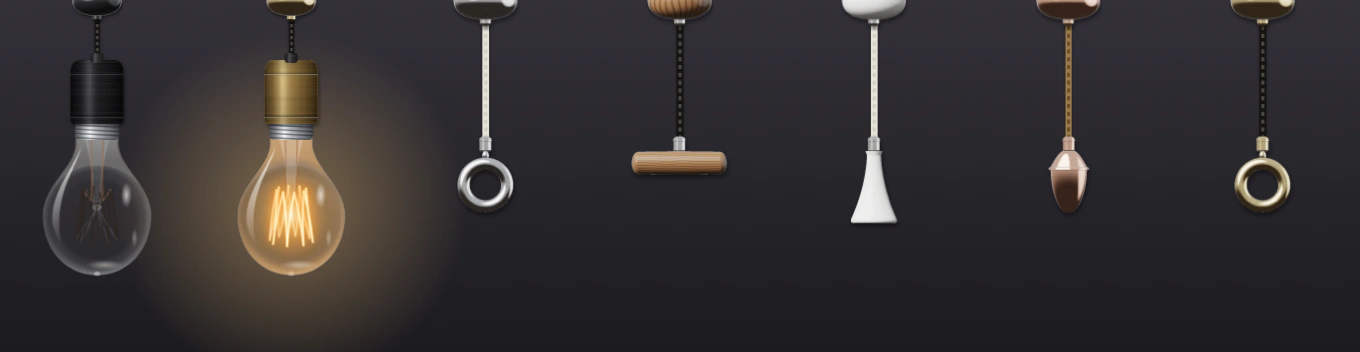
The light bulb is rendered in separate layers: glass, internal glow, filament, reflections and socket. The canopies and the optional pull handle, which can hang as a third lamp, are also constructed entirely in code using simple solids: lathed profiles, bars, rings and spheres.
Each pixel has a surface position and normal and is shaded using sixteen samples. Metal surfaces reflect a procedural studio environment made from a function, with a large softbox on the upper left, a narrow light on the right, gray walls and a dark floor. Subtle lathe marks add texture to the metal, while the grain on the wooden parts runs along their length.
For a while, the bulb’s glass refracted whatever was really behind it on your screen, bent through the curve of the glass. It looked great. It also needed screen recording, and macOS puts a purple indicator in the menu bar whenever an app records the screen. The first time I saw that dot sitting next to my pumpkin, I knew the effect had to go. A Halloween decoration shouldn’t make your Mac look like it’s being watched.
Sound
The click is generated when the app launches. A few milliseconds of noise create the initial snap, followed by sine waves at 3.1 and 1.45 kHz that decay to give it body. A quieter second snap comes 45 milliseconds later as the switch settles, along with a faint metallic ring. The candle’s extinguishing sound uses filtered noise shaped into a breath.
Starting audio playback can briefly block while the output device wakes, sometimes for tens of milliseconds. To keep the animation smooth, the sounds play through players prepared in advance, on a separate queue, away from the rendering thread.
The trailer is code too
I didn’t film the video at the top. The app has a hidden mode, --promo-video, that renders it. It builds the real lamps, with the same physics, frames, glow and flicker as in your menu bar, and runs them on a simulated 120 Hz clock. A scripted pointer interacts with the lamps using the real mouse-down, drag and mouse-up handlers. The desktop, Notes window and menu bar are all drawn programmatically. Smoke has to be simulated again using the app’s own settings because Core Animation doesn’t render particle emitters offscreen. The frames are rendered at 3× resolution and 60 fps, then encoded with AVAssetWriter. The app produces both English and Chinese versions in 16:9 and 3:4.
Two bugs are worth passing on.
The first caused rendering to freeze at twelve seconds. It stopped there more than once before the cause made sense. AVAssetWriter interleaves audio and video, so it stops accepting video when the audio falls behind. At the same time, the AAC encoder keeps its final packets until the audio track is marked finished. If you keep feeding video while waiting for audio, both end up waiting indefinitely. I fixed it by keeping the audio half a second ahead of the video and marking the audio track finished as soon as its last sample was submitted.
The second bug made the night sky look gray. I rendered the frames in sRGB and copied their pixels directly into a buffer tagged as Rec. 709. Apple’s video players decode Rec. 709 using a gamma of around 1.96, compared with sRGB’s 2.2. That lifted shadows and midtones by roughly 4 to 8 levels, enough to turn midnight into dusk. The solution was to have Core Graphics perform the color conversion:
// Simplified.
let video709 = CGColorSpace(
    name: "kCGColorSpaceCoreMedia709" as CFString)!

// The pixel buffer's context uses it…
let ctx = CGContext(data: base, width: w, height: h,
                    bitsPerComponent: 8, bytesPerRow: rowBytes,
                    space: video709, bitmapInfo: bgra)!

// …so drawing the sRGB frame into it converts the colors.
ctx.draw(frame, in: CGRect(x: 0, y: 0, width: w, height: h))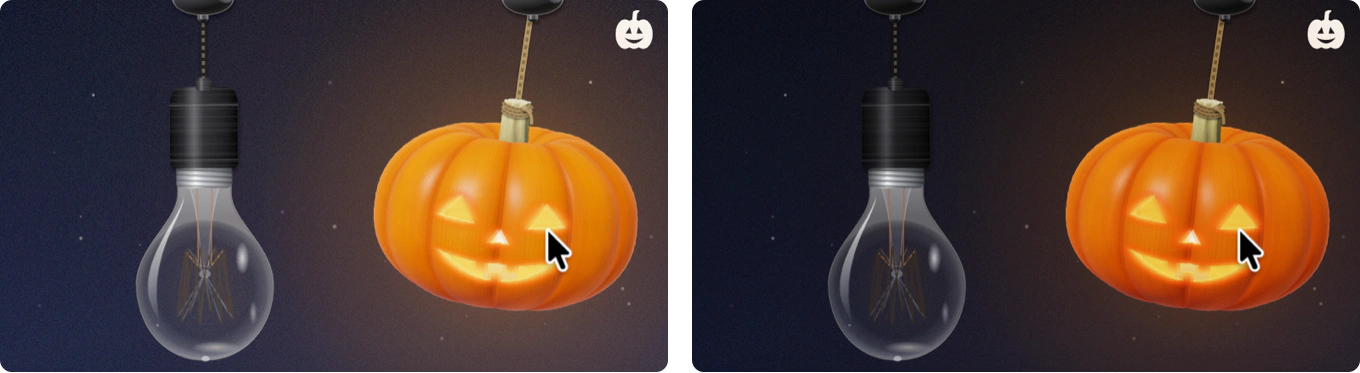
And the music
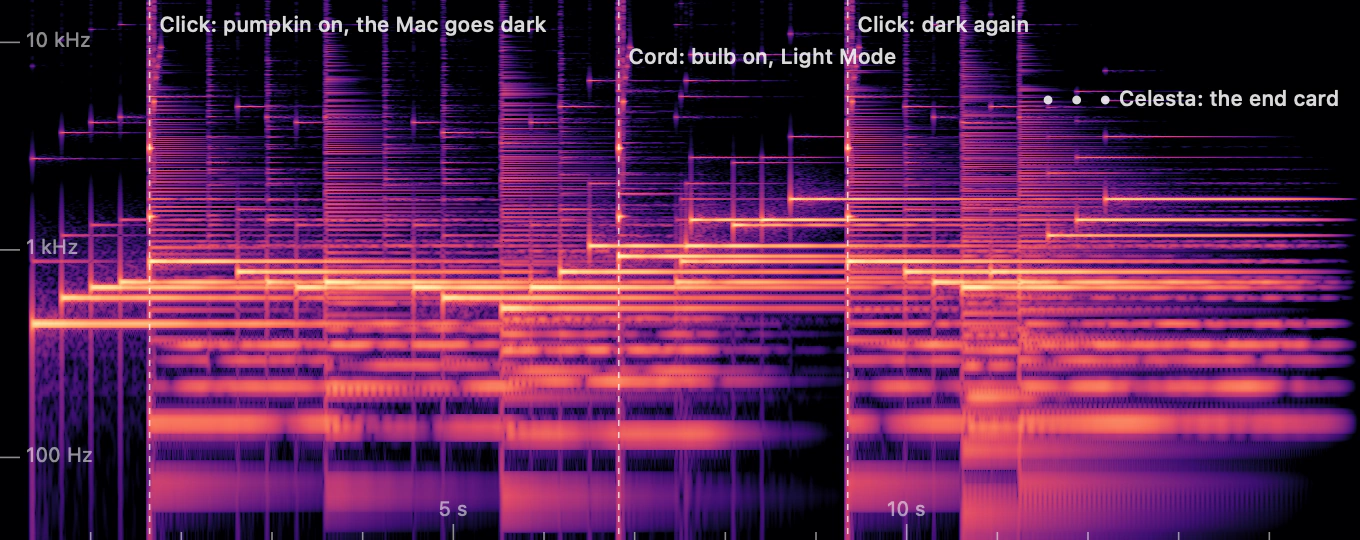
I wanted to avoid licensed music, so the trailer’s fifteen-second soundtrack is synthesized in code as well. It’s a short waltz in D minor.
The melody is played by a music box. Its sound starts with a clean, ringing tone and a slightly detuned second voice to reproduce the shimmer of a physical comb. Inharmonic overtones at 6.27 and 17.55 times the fundamental fade within a beat, accompanied by a small scrape from the pin.
The pizzicato strings use Karplus–Strong synthesis. A short burst of softened noise circulates through a delay line, with filtering that removes higher harmonics faster. An all-pass filter maintains the tuning, and a few resonances imitate the wooden body of the instrument.
Beneath that is a string pad made from four slightly detuned, band-limited sawtooth waves per note, passed through a low-pass filter.
Each of the three lines on the end card appears with a celesta note.
All of the instruments pass through a reverb produced by convolution with a synthetic concert-hall impulse response, with a separate response for each ear.
The music is synchronized to the visuals. Both clicks on the pumpkin fall on downbeats, while the light bulb’s cord is pulled on the upbeat just before Light Mode returns. To align everything, the tempo shifts by about 1% between those events. The strings only play while the Mac is in Dark Mode. Moving a click in the trailer script also moves the music with it.
Why bother
Nobody really needs a pumpkin hanging from their menu bar. The whole point of installing one is the small pleasure it brings, and that depends on details people might never consciously notice, like the cord slowly settling after a swing, or the flame sputtering for a moment before it stays lit. Most of the work on Pumpkin Lights went into those details.
Pumpkin Lights is free, with no account, no ads and no tracking, and runs on Apple silicon Macs with macOS 14 or later. Each lamp can do more than switch Dark Mode, too, from muting your Mac to running any Shortcut.
Get Pumpkin Lights, and happy Halloween.